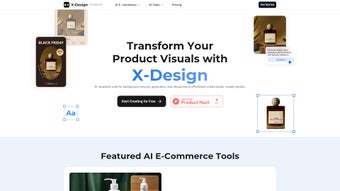

Download X Design – AI‑Powered Visual Creator for E‑commerce
X Design is a cutting‑edge, AI‑driven web application built specifically for online retailers who need high‑impact visual content without the overhead of traditional photo shoots. By combining background removal, AI‑generated fashion models, instant color swapping, and advanced video enhancement, X Design lets you produce professional‑grade product images and videos in a fraction of the time. Whether you run a boutique clothing store, a large marketplace, or a dropshipping business, the platform streamlines the entire visual workflow—from generating a clean white background to crafting lifestyle scenes with a single click.
Its intuitive interface and cloud‑based processing mean you can work from any device, making it a flexible solution for teams that collaborate across Windows, macOS, Linux, Android, and iOS environments. In this review we’ll explore the core capabilities, walk through the installation and usage steps, examine system compatibility, weigh the pros and cons, and answer the most common questions prospective users ask. By the end, you’ll have a clear picture of whether X Design is the right visual‑content engine for your e‑commerce strategy and how it can impact conversion rates, brand perception, and operational efficiency.
Key Features that Redefine E‑commerce Visuals
X Design’s feature set is deliberately focused on the pain points that e‑commerce teams face every day: time‑consuming photo editing, high production costs, and the need for consistent branding across thousands of SKUs. The AI models behind each tool have been trained on millions of product images, ensuring that the output is both realistic and adaptable to a wide range of industries. Below is a detailed look at the capabilities that set X Design apart from generic image editors.
- AI Background Removal: Instantly isolate products from any image, eliminating the need for manual masking and reducing edit time by up to 90%.
- AI Background Generation: Choose from a library of lifestyle scenes or let the AI create a custom backdrop with one click, perfect for creating on‑brand visual narratives.
- AI Fashion Model Creation: Generate realistic virtual models wearing your apparel, removing the cost of hiring photographers, models, and studios.
- AI Color Changer: Switch garment colors or product hues instantly, enabling rapid A/B testing of color variants without re‑shooting.
- High‑Definition Video Enhancement: Upscale low‑resolution footage, stabilize shaky clips, and remove backgrounds from video content, delivering broadcast‑quality product demos.
- Image Upscaling & Enhancement: Transform low‑resolution photos into crisp, high‑definition assets suitable for zoom‑in product galleries.
- Ready‑to‑Use Templates: Access pre‑designed e‑commerce layouts for banners, social ads, and product catalogs, dramatically cutting design time.
- One‑Click Export: Export images in PNG, JPEG, or WebP formats, and videos in MP4, all optimized for web performance and SEO.
- Secure Cloud Processing: All AI operations run on encrypted servers, ensuring data privacy and compliance with GDPR and CCPA.
- Continuous Updates: Frequent AI model improvements and new template releases keep the tool future‑proof and aligned with the latest design trends.
Together, these features provide a comprehensive toolbox that lets marketers, product managers, and small business owners create store‑ready visuals without leaving the browser. The result is a faster time‑to‑market, lower production spend, and a visual identity that can be scaled across global campaigns.
Installation, Usage Instructions, and System Compatibility
How to Get Started
Getting X Design up and running is deliberately frictionless. Begin by visiting the official website and clicking the “Download Free Trial” button. Because X Design is a SaaS solution, after entering your email address you’ll receive a secure activation link.
No bulky installers are required—simply log in through any modern browser (Chrome, Edge, Firefox, Safari) and the full suite loads instantly. For teams that prefer a desktop shortcut, X Design offers optional Progressive Web App (PWA) installation on Windows, macOS, Linux, Android, and iOS. This creates a native‑like window that launches the web app without a browser UI, preserving the seamless experience while still leveraging cloud processing.
Step‑by‑Step Workflow
- Upload Your Asset: Drag‑and‑drop product photos, sketches, or video clips onto the dashboard. The system automatically detects the media type and suggests the most suitable AI tool.
- Select a Tool: Choose from background removal, AI model generation, color swapping, video upscaling, or template application based on your creative goal.
- Adjust Settings: Fine‑tune AI confidence levels, pick a template style, or manually tweak colors using the built‑in slider. Real‑time previews let you see changes instantly.
- Preview in Real‑Time: GPU‑accelerated rendering on the server provides a smooth, lag‑free experience, even for high‑resolution assets.
- Export & Integrate: Download the final asset or push it directly to Shopify, WooCommerce, BigCommerce, or your CDN via the integrated API. You can also schedule bulk exports for large product catalogs.
Supported Operating Systems
X Design is designed to be OS‑agnostic. Because all heavy AI computation happens in the cloud, the client side only requires a stable internet connection and a browser that supports WebGL and WebAssembly. Officially supported platforms include:
- Windows 10/11 (any edition)
- macOS 11 (Big Sur) and later
- Linux distributions with recent Chromium‑based browsers
- Android 8.0+ (via the dedicated app or PWA)
- iOS 13+ (via the dedicated app or PWA)
The web‑based nature also means you can work from a Chromebook, thin client, or even a shared workstation in a co‑working space. As long as the device can run a modern browser, you’ll have full access to X Design’s AI capabilities, making it a truly cross‑platform solution for distributed teams.
Pros, Cons, and Frequently Asked Questions
Pros
- AI automation cuts visual production time by up to 80%.
- No need for expensive photography studios or model contracts.
- One‑click background generation and color swapping boost marketing agility.
- High‑definition video upscaling improves product demo quality.
- Secure cloud processing safeguards proprietary product images.
- Extensive template library accelerates campaign rollout.
- Cross‑platform accessibility via browsers and native PWA apps.
- Scalable pricing tiers support businesses from startups to enterprises.
- API and native plugins enable seamless integration with major e‑commerce platforms.
- Regular feature updates keep the tool aligned with emerging design trends.
Cons
- Reliance on internet connectivity; offline editing is not possible.
- Subscription pricing may be higher than basic photo editors for very small boutiques.
- AI model generation sometimes requires manual fine‑tuning for niche apparel styles.
- Export limits on the free tier can restrict heavy‑volume users.
- Learning curve for users unfamiliar with AI‑driven design concepts.
- Advanced video features consume more processing credits, potentially increasing costs.
Frequently Asked Questions
Can I use X Design for non‑fashion products?
Absolutely. While the AI fashion model feature shines for apparel, X Design’s background removal, color changer, and video enhancement tools work equally well for electronics, home décor, cosmetics, and virtually any product category.
Is there a free version or trial?
Yes. X Design offers a 14‑day free trial with access to all core features and a limited number of exports per month. This allows you to evaluate the AI quality before committing to a subscription.
How secure is my data during processing?
All uploads are encrypted in transit (TLS 1.3) and at rest (AES‑256). The platform complies with GDPR and CCPA, and images are automatically deleted from servers after 30 days unless you opt for longer storage.
Can I integrate X Design with my e‑commerce platform?
Yes. X Design provides RESTful APIs and native plugins for Shopify, WooCommerce, BigCommerce, and Magento, allowing seamless import of generated assets directly into product listings.
What subscription plans are available?
Pricing tiers include a “Starter” plan at $29/month (up to 200 exports), a “Growth” plan at $79/month (unlimited exports, priority support), and an “Enterprise” custom plan with dedicated AI model training and SLA guarantees.
Does X Design support bulk processing for large catalogs?
Yes. The platform offers batch upload and automated workflow scripts that can process thousands of images overnight, ideal for seasonal catalog updates.
Conclusion – Is X Design Worth the Download?
In today’s fast‑paced digital marketplace, visual content is the primary driver of conversion. X Design equips retailers with AI‑powered tools that replace costly photo shoots, accelerate creative iterations, and maintain brand consistency across thousands of SKUs. The platform’s cloud‑first architecture ensures you can work from any device, while the extensive template library and one‑click export options keep your workflow streamlined. Although a reliable internet connection is mandatory and the subscription price may seem steep for micro‑businesses, the time saved and the boost in visual quality often translate directly into higher sales, lower return rates, and stronger brand perception.
If you’re looking to scale your e‑commerce visuals without expanding your creative team, download X Design today and take advantage of the free trial to experience AI‑driven design first‑hand. Let the technology handle the heavy lifting so you can focus on strategy, growth, and customer experience.






